Get started in three steps
1. Pin Normalize Volume
Open Chrome’s puzzle-piece Extensions menu, find Normalize Volume by name and its original icon, and select the pin. Then return to the tab you want to listen to.
2. Start a video or podcast
Play audio at a comfortable device volume. Click the Normalize Volume toolbar icon on that same tab. The controls shown here match the 1.08 release.
3. Enable Audio spike guard
Turn on the switch and read the status below the slider. Start with Spike ceiling at 60%, then adjust gradually. Switch processing off at any time to hear the original audio.
The controls you will see
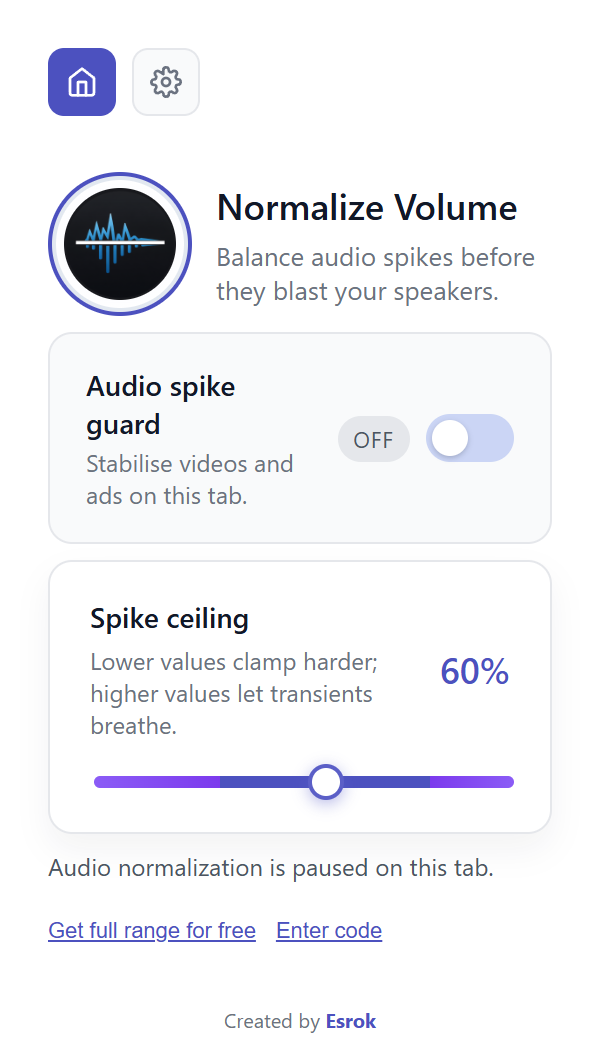
Audio spike guard
Turn processing on or off for the tab you are using. The status reads “Audio normalization is active on this tab.” when active, or “Audio normalization is paused on this tab.” when paused.
Spike ceiling
Start at 60%. Lower values clamp harder; higher values let transients breathe. Adjust in small steps while keeping your player and device volume steady. This is not a replacement for your system volume control.
Settings
Select the gear icon to find Dark Mode. This changes the popup appearance, not the audio processing. Use the home icon or back arrow to return to the audio controls.
Try a repeatable listening check
Choose a short passage containing both speech and a louder intro or music section. Listen to the same 20–30 seconds twice: once with Audio spike guard on, then with it off. Leave the website player and device volume unchanged.
Listen for less abrupt changes between quiet and loud sections, not simply which pass is louder. Change only Spike ceiling and repeat. Keep your device volume comfortable; the extension does not guarantee hearing-safe output.
Full range is a free email-code unlock
The included range is 40–90%. Version 1.08 offers 10–100% through Get full range for free—not a paid protection trial.
- Open the extension and select Get full range for free.
- Read the email notice: continuing means agreeing to receive Esrok security tips and setup emails. If you want to proceed, enter your email and select Continue free.
- Enter the code you receive and choose Verify & unlock. The code is not case-sensitive. If you already have it, choose Enter code from the main popup.
You can keep using the included range without signing up. The unlock window also offers a reminder in seven days. If the message is missing, check spam and use Resend code or Change email. Never share your code with support.
If the audio does not sound right
No sound at all
Check the website player, Chrome’s tab mute setting, and your selected output device first. Pause Audio spike guard to compare. If needed, reload the media page and activate it again.
No noticeable difference
Open the popup from the tab actually playing sound. Compare the same short passage with processing on and off, without changing system volume. Audio that is already even may change very little.
A page cannot be captured
Try an ordinary video or podcast page. Chrome internal pages and restricted media may not be available for tab capture. Normalization cannot repair clipped recordings, remove background noise, or restore missing audio.
What happens to your audio and email?
Tab audio is processed locally in Chrome; it is not uploaded to Esrok as a recording. Extension preferences use Chrome extension storage. The optional email unlock is separate: submitting that form shares your email for the stated Esrok emails.
Uninstalling the extension does not unsubscribe you from emails. Use the unsubscribe link in an email if you no longer want them. Read our privacy policy for more information.

 NORMALIZE VOLUME · 1.08